AI Assistant Connectivity: The Next Step in Wedding Photography Workflows
AI assistants are becoming part of everyday wedding planning. Learn how connected assistants help photographers work with less admin, and how Zaiya extends that access to clients.
Share this post
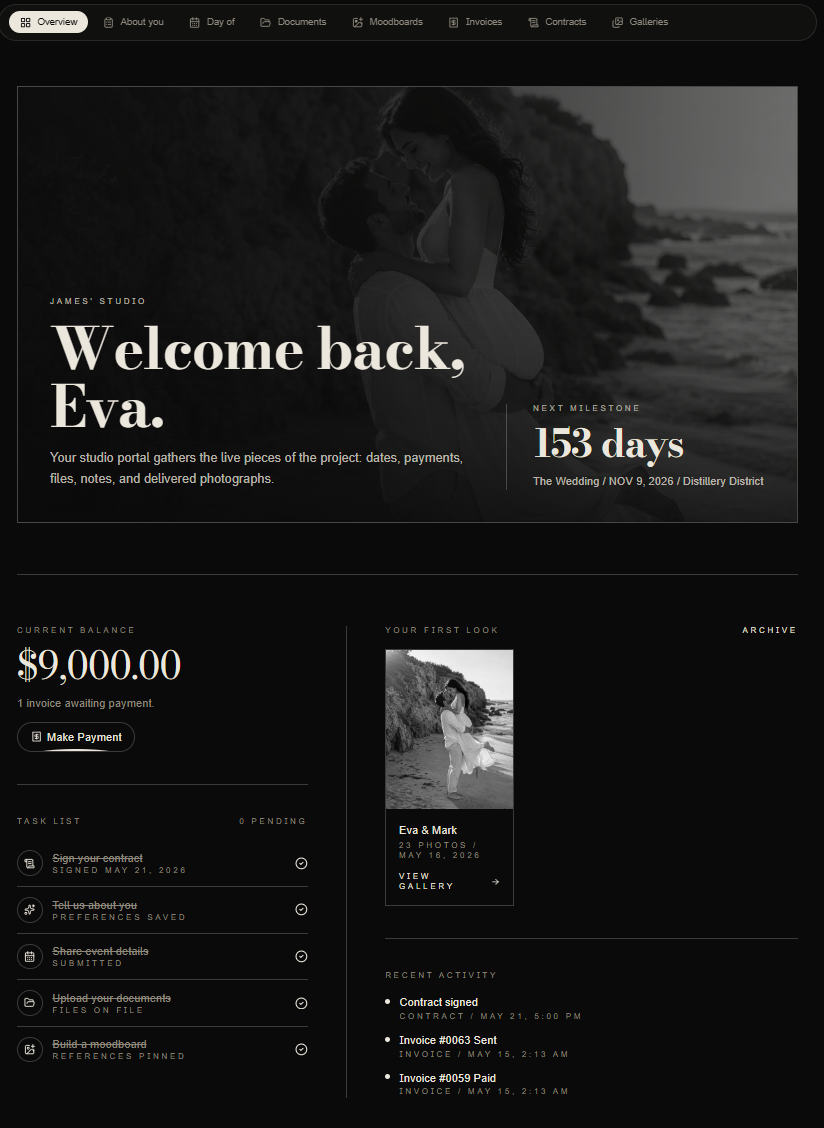
A bride asks her AI assistant to summarize the wedding photography schedule before a planning call. Her photographer asks their assistant what is coming up this week. Both want answers grounded in the information their studio has already organized.
That is the promise of AI assistant connectivity: giving an assistant permission to retrieve relevant information from the tools people actually use, rather than asking someone to copy it into a chat.
For wedding photographers, this shift reaches beyond faster administration. It changes how a studio can serve a generation of increasingly tech-savvy, AI-native brides and couples.
Why connected AI assistants are gaining attention
An assistant can help you write an email without knowing anything about your business. A connected assistant can retrieve permitted project information and help you reason about it in context.
That difference matters when your day involves several weddings, planning conversations, outstanding balances and gallery deliveries. Instead of repeatedly explaining the background, you can ask a focused question and have the assistant consult the connected system.
The wider photography business software market is moving in this direction. HoneyBook's official connector documentation now describes connecting a business account to an external assistant. Connectivity is becoming a practical product category, rather than a distant possibility.
Standards such as the Model Context Protocol, or MCP, help compatible assistants communicate with connected tools. Photographers do not need to learn the protocol to understand the benefit: less manual context gathering, with access controlled by the studio.
The useful question is what an assistant can access, whose permission it needs and how that access can be stopped.
The next generation of brides is increasingly AI-native
For many younger clients, asking an assistant to organize information is already an ordinary habit. They use conversational tools to compare options, prepare questions and make complicated plans easier to understand.
Pew Research Center's June 2026 findings show that 66% of U.S. adults aged 18 to 29 use AI chatbots, compared with 49% of adults overall. That is evidence of familiarity with AI, rather than proof that every young client wants an automated wedding experience.
Wedding-specific research points in the same direction. The Knot Worldwide's 2026 Real Weddings Study announcement reports that AI adoption among couples nearly doubled year over year, reaching 36%.
Our interpretation is that more brides and couples will arrive with an assistant already in their planning routine. They may expect to ask a question, get a useful summary and return to the original source when a decision matters.
A photography studio can meet that expectation while preserving personal service. The assistant helps clients find and understand information; the photographer remains responsible for the creative relationship, commitments and final advice.
This is another reason to invest in a well-organized client portal for wedding photographers. A useful connection starts with a dependable home for the project.
How connectivity helps a photographer's workflow
Prepare for a planning call
A connected assistant can retrieve permitted wedding details and help you prepare a concise briefing: the date, locations, recorded timeline and questions to confirm.
For example: “Summarize the recorded wedding plan for my next consultation and flag details I should verify.”
You still review the result and discuss changes with the couple or planner. The potential time saving comes from collecting context before the conversation.
Understand the week ahead
Ask about upcoming shoots or recorded availability, then use the response to plan preparation time. A conversational overview can be easier to work through than opening several records in succession.
This works best alongside a clear inquiry-to-gallery photography workflow. Connectivity makes an organized process easier to consult.
Review financial context with the right permission
Where enabled and separately authorized, Zaiya's studio connector can return aggregate collections and forecasts based on recorded invoice balances and due dates.
That can support a question such as “What does the next 90 days look like for scheduled collections?”
The result is a planning aid. Collections are not profit, and incomplete records affect the outlook. Check the data-coverage notes and the underlying Finance report before making business decisions.
Reduce repeated explanations
An assistant can help summarize permitted records or turn retrieved information into a briefing within its own conversation. Zaiya's connector is read-only: it does not send messages, save drafts, update bookings, sign contracts or move money.
Keep the distinction clear when designing your process. The wedding photography workflow automation guide explains where event-driven actions and human review belong.
Zaiya connects the client side as well
The client experience is where Zaiya takes this idea further. Studios can connect an approved assistant to permitted workspace information, while clients can use a separate Atrium Pass for their own permitted project context.
As of October 2026, Zaiya is the only photography CRM we have identified with native, client-controlled assistant connectivity built directly into its client portal.
That is a narrower distinction than claiming no other CRM can ever be connected. Third-party client-portal connectors exist, and products change. Zaiya's approach makes client access part of the Atrium itself, with a dedicated pass and client-specific permissions.
When the studio enables assistant access, the client opens Connected access in the Atrium, creates a labelled pass with the available expiry and permission options, and uses it with a compatible assistant setup. Passes can be revoked. Assistant compatibility and directory availability depend on the provider and setup.
A bride or couple might ask a connected assistant to summarize their recorded wedding timeline or explain the invoice information available through their pass. The assistant can retrieve only what that client's permissions allow.
The client does not receive a studio-wide credential. Atrium Pass responses exclude internal notes, contact details, package prices and private planner relationship records. Gallery access follows the existing sharing rules, including delivery and expiry requirements for hosted galleries.
Read-only access also means the assistant cannot pay an invoice or sign an agreement. Those actions remain in the established client journey.
What this feels like for an AI-native couple
Imagine a couple preparing for their final photography meeting. Their wedding plan is organized in the Atrium. With assistant access enabled and a compatible connection set up, they ask for a summary of the recorded schedule and use it to prepare questions.
The assistant helps them arrive prepared. The photographer and planner still confirm whether the schedule works, account for travel and lighting, and agree on any revisions.
That division can reduce repetitive information requests without making the relationship impersonal. Clients get another way to consult their project; they still know who is responsible for it.
Introduce this as an option during onboarding. Explain what it can read, where official information lives and how to disconnect. Our guide to introducing a client portal to wedding clients offers a useful starting point for keeping that introduction simple.
Keep trust at the center of the connection
Start with limited permissions and current records. Confirm that important answers reflect the correct project and the latest agreed information. If a record is missing, ask the studio rather than accepting a plausible guess.
Clients should also understand that information retrieved by an external assistant is handled under that provider's policies. Revoking a pass stops future access; it cannot erase information the assistant already received.
Offer direct portal access and personal communication alongside connectivity. Being AI-native does not mean every bride wants to use AI for every wedding decision.
A more connected photography experience
Assistant connectivity gives photographers a practical way to consult business information with less manual preparation. Extending that connection to clients recognizes how modern couples increasingly organize their lives.
Zaiya brings both sides into the same photography experience: studio access for approved business questions, and client-controlled Atrium Passes for permitted client context.
The goal is a calmer workflow and better-prepared conversations, with the photographer's judgment and personal service at the center.
Book a private Zaiya walkthrough to see the studio connector and client Atrium experience.