Client Portal for Wedding Photographers: Complete Guide
Learn what a wedding photography client portal should include and how it creates a more organized experience for couples, planners, galleries, and payments.
Share this post
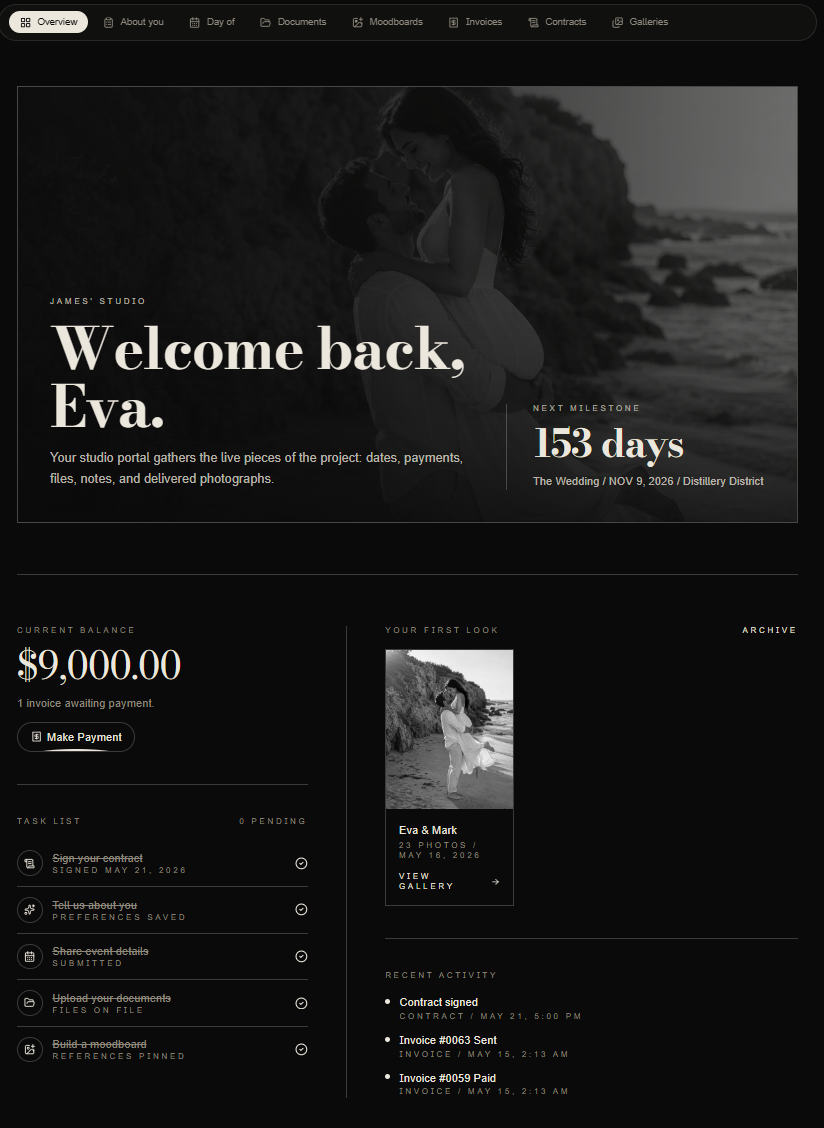
A client portal for wedding photographers is a private online space where a couple can find their booking documents, planning details, conversations and delivered photographs. Its purpose is practical: make the next action clear and keep the current information in one place.
A gallery answers “where are our photographs?” A CRM helps the studio manage its work. A client portal connects that work to the people being photographed. The useful test is whether a couple can find their agreement, check what is due and confirm the wedding plan without asking you to resend a link.
This guide explains how to choose and organize that shared space, using Zaiya's Atrium as a concrete example. The linked checklists go deeper into individual tasks; you do not need to introduce every feature at once.
What belongs in a wedding photography client portal?
Start with information the couple needs repeatedly. Keep your private production work separate, and publish details only when they are ready to be shared.
Booking documents and payment information
Give clients an obvious route to their proposal, agreement and invoices. Distinguish an amount that is due from an amount already paid, and explain where they should ask a billing question. A document existing in your studio workspace is not enough: check that the intended recipient can actually open it.
Before sharing, reconcile the agreement, invoice dates and your wedding photography payment schedule. A portal should display the agreed terms, not introduce a different payment promise.
Questionnaires and planning details
Ask for the information needed to photograph this wedding: locations, important people, family-photo groupings, priorities and practical constraints. Give the couple a manageable first task, then collect details as plans become clearer.
Use the wedding photography questionnaire guide to decide which questions belong in each stage. Avoid collecting sensitive information simply because a form has room for it. Explain who will see shared answers and how clients can correct them.
A current timeline
Show which plan is current and which details still need confirmation. Put fixed commitments, such as ceremony time and venue access, before flexible portrait blocks. When a plan changes, identify who reviews it and how the final version reaches the people who need it.
The timeline with a wedding planner guide covers that handoff. For several events, use the multi-day wedding timeline guide to separate dates, locations and responsibilities instead of stretching one day into an unreadable list.
Files, conversations and galleries
Keep reference files and project discussions beside the work they explain. Use email to invite, remind and communicate personally; use the portal for the durable record clients should return to. The client portal versus email guide explains where each channel works best.
At delivery, tell the couple what is available, how to download it, which sharing rules apply and what to do if access fails. Whether you host photographs in the portal or link an existing gallery provider, follow the same gallery delivery checklist.
Who should see what?
The couple, planner and photography team have different jobs. Giving everyone the same login is not a collaboration strategy.
- The couple: their shared planning information, relevant documents, invoices, conversations and galleries.
- The planner or invited collaborator: the project details intentionally shared for their role, such as timing, shot lists and vendor coordination. Client balances, contracts and private studio notes should not become visible just because someone needs a schedule.
- The studio: internal preparation, team responsibilities and the business records needed to manage the relationship, according to workspace permissions.
In Zaiya, clients use email-link access to their Atrium; invited collaborators have a separate access flow. Invite each person using their own correct address. A studio preview is useful for preparation, but it is not proof that a client or planner has identical access.
Use the planner portal permissions guide before sharing with another professional. When bringing in a second photographer, also review the second-photographer handoff: a clear assignment and appropriate project access matter more than exposing the entire client record.
A practical example: one wedding from booking to delivery
Consider a studio photographing a wedding with a planner and a second photographer. The portal can support the following sequence without asking the couple to learn the studio's whole operating system.
- After booking: prepare the client record, verify both partners' addresses and check the agreement and invoices. Give the couple one first action, such as completing the initial planning questions.
- During planning: add locations, reference files and the developing timeline. Invite the planner separately with only the required visibility. Keep open questions beside the relevant details.
- Before the wedding: review the latest plan with the couple and planner. Resolve conflicting times and distribute the confirmed production information to the photography team.
- At delivery: make the gallery easy to find, explain downloads and sharing, and keep a clear support route available.
This is an illustrative workflow, not a claim that every step happens automatically. Your studio still owns preparation, permissions, follow-up and confirmation. The client onboarding checklist and production-readiness guide cover the two handoffs most likely to need a deliberate review.
How to evaluate a portal before committing
Try the same small scenario in every product you consider. Create a sample project with fictional details, invite a test recipient you control and open it on a phone. Do not upload real client documents just to evaluate a workflow.
Check whether you can:
- Find the next action without an explanation from the photographer.
- Open the intended agreement, invoice and planning information.
- Tell which timeline or document is current.
- Separate the couple's information from planner and team access.
- Return to the space in the same browser, and recover access on another device.
- Open a gallery and understand the download instructions.
- Export or retain the business records you need if you later change tools.
Use the client portal checklist for the detailed visibility review. If you are also choosing a business platform, the wedding photographer CRM guide addresses studio operations beyond the client-facing portal.
How Zaiya's Atrium fits this workflow
Zaiya gives a studio a private Atrium for each client relationship. The studio prepares the relevant planning, documents, moodboards, galleries, invoices and contracts, then manages access for clients and invited collaborators. Galleries can be hosted in Zaiya or linked from an existing provider, subject to the supported workflow and membership limits.
The studio manages the work from its own account. Couples enter through their client email links, and collaborators use their assigned access. A remembered browser session can make return visits easier; a different device, cleared cookies or expired session may require a new link. Access links should not be forwarded as shared passwords.
Optional assistant connectivity is separate from ordinary portal access. When the studio enables it, a client can create an Atrium Pass for a compatible assistant. Passes have limited, revocable access and do not expose internal studio notes or the full client record. The assistant connectivity guide explains setup and limitations, including why revocation cannot erase information an assistant already retrieved.
To evaluate the actual product, request a private walkthrough with the booking, planning or delivery scenario your studio needs to solve. Check current membership details before choosing a plan.
Introduce the portal as part of your service
Explain what the couple will find, how to return and what you need them to do first. A short welcome is usually more helpful than a list of every available section. The portal introduction guide provides a staged approach.
Keep your communication personal. A portal cannot replace responding thoughtfully to an inquiry, resolving uncertainty or coordinating professionally with vendors. Connect it to a clear inquiry-response process and the vendor-professionalism practices that protect planner relationships.
For a premium studio, a consistent experience is more useful than a decorative login page. The white-glove service guide and white-label experience audit help you examine the whole journey. The broader luxury wedding photography guide puts that service work in the context of positioning and referrals.
Questions photographers ask about client portals
Is a client portal the same as a CRM?
No. A CRM helps the studio organize relationships and business activity. A portal is the part intentionally shared with the client. One product can provide both, but permissions and the client experience still need separate checks.
Can I keep my existing gallery provider?
A portal can include an external gallery link rather than hosting every photograph itself. Zaiya supports linked galleries as well as hosted delivery. Review the supported provider experience, access and download behavior before promising a seamless handoff to clients.
Should a planner use the couple's invitation?
No. Invite the planner through the collaborator workflow and review the information shared with that role. Forwarding a couple's access link can expose the wrong information and makes individual access harder to manage.
Does a portal replace email?
No. Email remains useful for invitations, reminders and personal communication. The portal provides the shared record. Give each channel a clear role so clients know where to find the current information.
Will a portal guarantee fewer messages or more referrals?
No. Those outcomes depend on your process and clients. Measure repeated link requests, unfinished planning tasks and delivery questions before and after introduction. A clear portal can support a better service, but it does not replace the photographer's work.