Wedding Photography Client Portal Checklist: What Clients Should Find
A practical checklist for deciding what couples should see in a wedding photography client portal, what should remain private and when each resource should appear.
Share this post
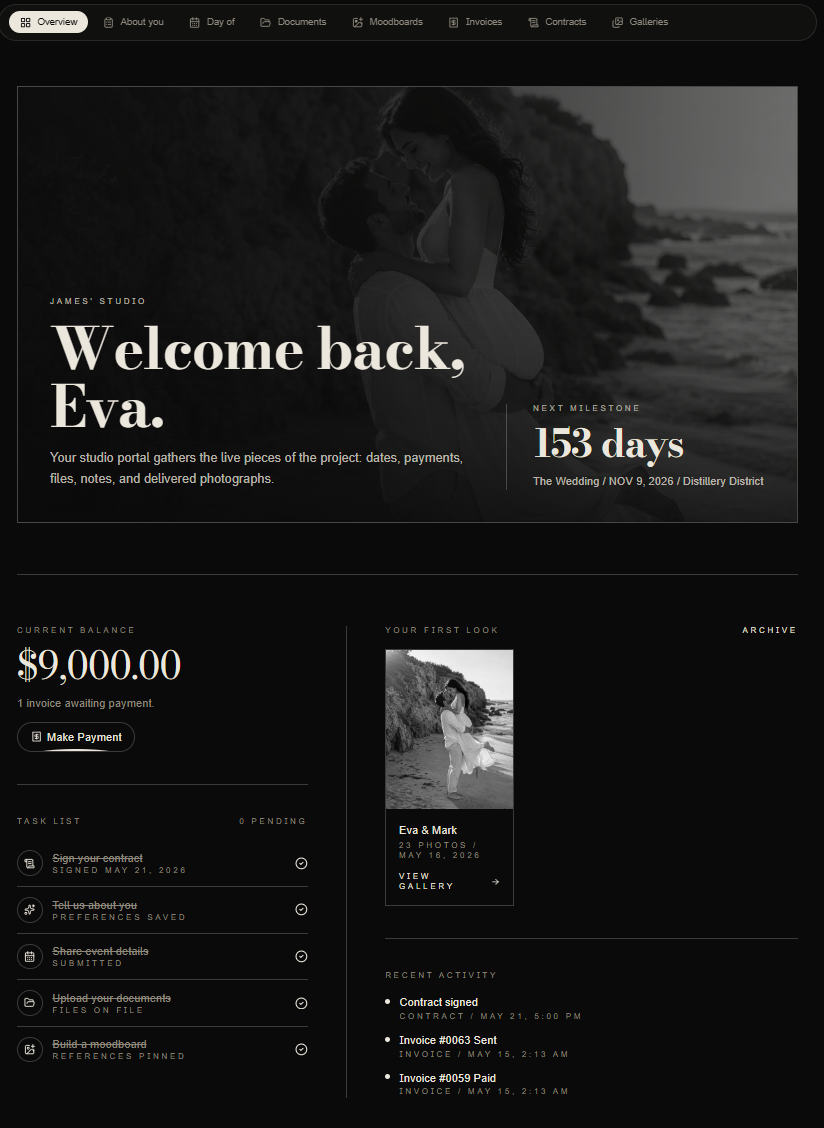
The short answer
A wedding photography client portal should give a couple one calm place to find the details they repeatedly need: their agreement, payment status, questionnaires, timeline information, shared files, messages and delivered galleries. It should not expose internal notes, unrelated projects or collaborator information that the couple does not need.
The best portal is not the one with the longest feature list. It is the one that answers the client's next question without requiring another email. This checklist supports the broader client portal for wedding photographers with a practical way to decide what belongs in the shared experience.

A client portal should make the current milestone, financial status and delivered work easy to understand without exposing the studio's private workspace.
Start with identity and access
Before adding content, confirm that the right people can enter the right project. Each invitation should identify the couple, the wedding or event and the studio. Access should work well on a phone, should not require technical knowledge and should make it clear how to ask for help.
Test every invitation from a signed-out browser. Confirm that one client cannot reach another client's project by changing a URL. If both partners receive access, decide whether they share the same permissions or have separate identities. A planner should receive a scoped collaboration view, not the couple's login.
Show the booking documents clients actually use
Clients should be able to find the current proposal, signed agreement and any approved changes without searching an email archive. The portal should distinguish a draft from a final document and show whether a signature is still required.
Do not publish outdated versions beside the current agreement without a clear status. If a collection changes, preserve the record while making the active terms obvious. The proposal checklist explains how to keep the offer, agreement and next action aligned.
Make invoices and payment status understandable
A useful portal shows invoice totals, payments received, remaining balances, due dates and the correct payment route. It should also explain who to contact when a name, amount or schedule needs correction.
Financial information requires extra care when a planner or family member joins the project. Couples may need full invoice access while a planner needs only the event schedule. Build those roles deliberately instead of sharing one universal login. The payment schedule guide covers the timing and wording behind the numbers.
Release questionnaires at the right moment
A portal should not become a storage room for every form the studio might eventually need. Show the questionnaire that supports the current planning stage, explain why it matters and state when it is due.
Early questions can cover names, communication preferences, venues and planner details. Family groupings, final logistics and sensitive relationship notes belong closer to the event, when the answers are more likely to be accurate. Use the wedding photography questionnaire guide to sequence those requests.
Give the timeline one authoritative home
The couple should know which schedule is current and when it was last reviewed. If the portal displays event timing, it should identify the date, location, responsible contact and any decision still waiting for confirmation.
Avoid presenting a studio draft as though it were the planner's final production schedule. The portal can show the photography-specific view while the planner collaboration process maintains the broader event authority. When several people are involved, the planner portal guide helps define appropriate visibility.
Connect gallery delivery to the project
Gallery delivery should feel like the next chapter of the same relationship. The portal can show whether a gallery is being prepared, delivered or archived, then provide the approved viewing and download experience.
If the studio uses an outside gallery platform, the portal should still provide one dependable route to the final work. If the gallery is hosted inside the same system, confirm that favorites, downloads and sharing rules match the studio's promise. The goal is continuity, not consolidation for its own sake.
Keep studio-only information private
Internal notes, team assignments, profitability, private vendor feedback and operational risk flags do not belong in the couple's portal. The studio needs a clear boundary between the client experience and the internal workspace.
Review that boundary after every new feature or integration. A useful test is simple: if this field appeared in a screenshot sent by the client, would the studio be comfortable explaining it? If not, keep it internal or create a purpose-built client summary.
Run a monthly portal quality check
Choose one active wedding and verify the experience as the client would see it:
- The names, date and locations are correct.
- The next milestone is clear.
- The current agreement and invoice are easy to find.
- Old drafts are not presented as active.
- Questionnaires appear at the appropriate stage.
- Timeline information has a visible owner or review date.
- Gallery status and access are accurate.
- Planner access is separate and appropriately limited.
- Internal notes and other projects remain private.
- Every visible action works on a phone.
This review pairs naturally with the client onboarding checklist. Onboarding creates the shared space, while the monthly check keeps it trustworthy.
Frequently asked questions
Should a wedding photography portal replace email?
No. Email is still useful for personal conversation and timely notifications. The portal should hold the durable record so clients do not have to rely on old messages to find the current document, balance or timeline. The portal versus email guide explains the division of responsibility.
When should clients receive portal access?
Usually after the studio's booking requirements are complete. Introduce it as part of the welcome process, explain what is available now and say what will appear later. The client portal onboarding guide provides a staged rollout.
Does every client need the same portal layout?
The underlying structure can remain consistent, but visibility should reflect the project. A multi-day destination wedding may need more schedule and collaborator detail than a small local celebration.
Book a private Zaiya walkthrough to see how the Atrium can support your client experience.