Client Portal vs Email for Wedding Photographers: What Belongs Where
A practical division of responsibility between email and a wedding photography client portal, so conversations stay personal while project details stay dependable.
Share this post
The short answer
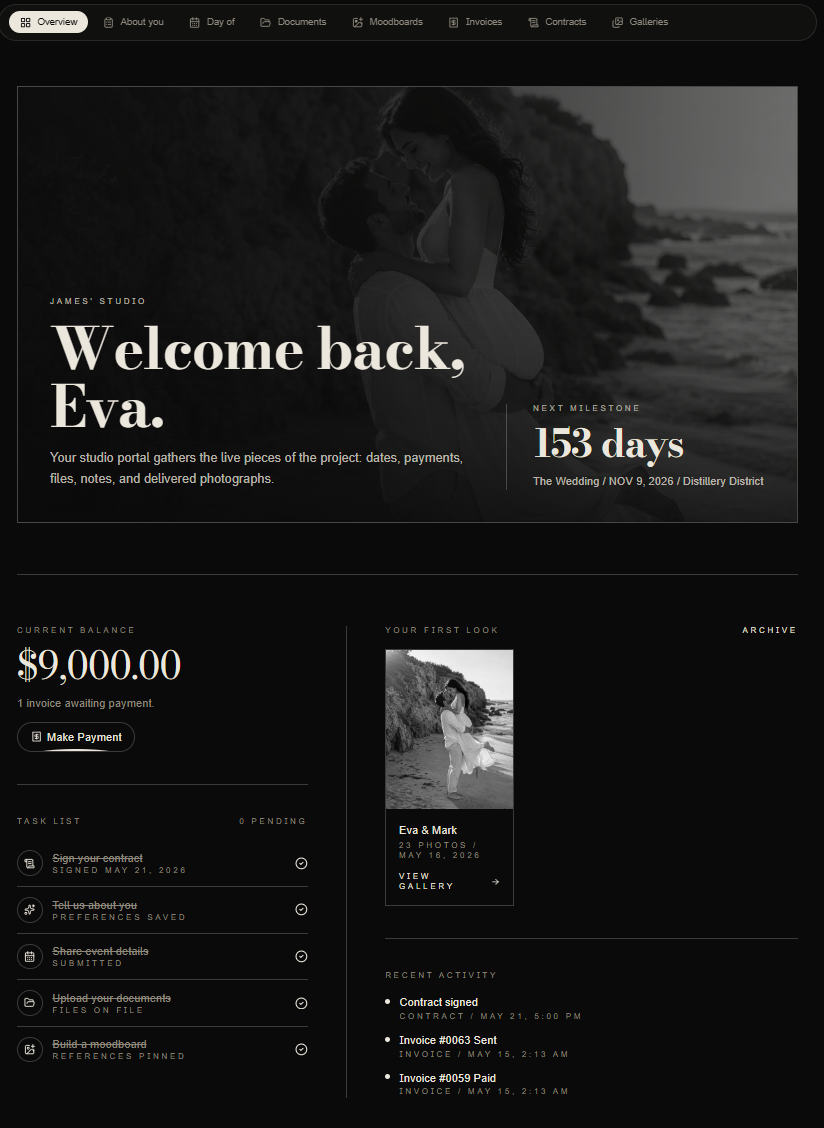
Wedding photographers should use email for timely conversation and a client portal for the durable project record. Email is effective for personal context, questions and notifications. The portal is better for current contracts, invoices, questionnaires, timeline details, files and galleries that clients may need to find again.
The choice is not client portal or email. A polished workflow gives each channel a clear job. The client portal for wedding photographers explains the complete client experience, while this comparison defines where information should live.
Why email alone becomes unreliable
Email is familiar and flexible, but it organizes information by conversation rather than by wedding. A single project can create separate threads for booking, payments, questionnaires, timelines, planner updates and gallery delivery. Attachments become outdated, links get buried and one partner may not have the same message history as the other.
This does not make email a bad tool. It means email should not be the only source of truth for a long, high-value project.
What email does especially well
Email carries tone and context. It is the right place for a thoughtful reply to an inquiry, a personal congratulations after booking, a nuanced planning conversation or a note that acknowledges something specific about the couple.
It is also useful for alerts. A short message can tell the client that a proposal is ready, a payment date is approaching or a gallery has been delivered. The message should point to the current item rather than duplicate it as another attachment.
Use email for:
- Personal conversation and relationship building.
- Notifications about a clear next step.
- Questions that need explanation or judgment.
- Confirming that an important portal update is available.
- Handling unusual circumstances with care.
What belongs in the client portal
The portal should hold information that must remain current, secure and easy to retrieve. A client should be able to return months later and know which version is authoritative.
Use the portal for:
- Proposals and signed agreements.
- Invoices, payment status and receipts.
- Questionnaires and submitted answers.
- Photography timelines and confirmed logistics.
- Shared files and approved reference material.
- Gallery status, delivery and archive access.
- A clear project milestone or next action.
The client portal checklist provides a more detailed visibility review.
Avoid maintaining two sources of truth
The most common mistake is sending a document by email and placing a different version in the portal. The couple cannot know which one is current, and the photographer has to reconcile both later.
Instead, send a concise email that links to the authoritative portal item. If a timeline or invoice changes, update the source first, then notify the relevant people. Keep the email as a record of the conversation, not a competing document store.
This rule is particularly important for payment schedules and event timing. Small differences can create real operational or financial confusion.
Keep the communication personal
A portal should reduce repetitive administration, not remove the photographer from the relationship. Clients still want to know that a real person understands their wedding.
Automated messages can confirm receipt, remind clients about a known deadline and surface the next milestone. Personal messages should handle creative conversations, sensitive family information, schedule conflicts and moments that deserve a human response.
The email workflow guide offers a practical way to decide which messages can be standardized and which should remain personal.
Give planners a separate route
Forwarding a couple's email history to a planner exposes too much and still does not create a dependable working space. Sharing the couple's portal login is not a good substitute because financial and private information may be visible.
Give planners and collaborators their own scoped access to the schedule, shared files, selected galleries and coordination details they need. Keep balances, private couple messages and studio notes outside that view. The planner portal guide explains this boundary in more detail.
Build a simple notification pattern
Every portal update does not need an email. Notify clients when an action is required, a deadline changes or meaningful new material becomes available. Avoid sending multiple messages for a single update.
A useful pattern is:
- Update the authoritative portal item.
- Confirm that permissions and recipients are correct.
- Send one concise notification with context.
- Stop reminders when the action is complete.
- Record delivery failure without undoing the portal update.
This keeps communication visible without turning the inbox into a second project-management system.
How to transition existing clients
Do not move an active wedding into a portal without explanation. Prepare the project, verify the documents, then send a personal introduction that explains what has changed and what has not.
Tell the couple that email remains available for conversation. Clarify that the portal is now the reliable place for current documents, payment information, planning details and delivered work. Give them one first action and invite them to report anything that looks incorrect.
The client portal onboarding guide provides a complete rollout sequence.
The practical decision
Keep email when the value is the message itself. Use the portal when the value is finding the correct information later.
That distinction produces a calmer experience. The photographer can communicate personally without repeatedly attaching the same documents. The couple can return to one private space without searching for the right thread. The planner can access appropriate information without entering either the couple's inbox or the studio's internal workspace.
Frequently asked questions
Can a client portal replace all client emails?
It can replace many document sends and routine reminders, but it should not replace thoughtful conversation. Premium service still benefits from a clear human voice.
Should contracts be attached to email?
Send a secure link to the current agreement whenever possible. This reduces version confusion and keeps the signature status with the authoritative document.
What if clients never open the portal?
Confirm access early, give them one meaningful first action and use email notifications that link directly to the relevant item. Do not wait until a critical deadline to discover that access failed.
Book a private Zaiya walkthrough to see how the Atrium can support your client experience.