How to Automate a Wedding Photography Workflow Without Sounding Automated
A practical automation model for wedding photographers who want faster operations while keeping communication personal, specific and trustworthy.
Share this post
The short answer
Automate the movement of work, not the performance of intimacy. Let software create tasks, calculate dates, confirm form submissions, send factual reminders and surface exceptions. Keep a person responsible for the first meaningful reply, recommendations, sensitive planning conversations and final approvals. Every client-facing automation should identify a real event, use current project data and have an owner who can intervene.
Build the stages first with the inquiry-to-gallery workflow. Automation cannot repair an undefined process.
Start with a stable manual workflow
If two team members handle the same situation differently, automating it will make the inconsistency faster. Document the current trigger, decision, action, owner and completion evidence before choosing a tool.
A good automation candidate is repeated, rule-based, time-sensitive and easy to verify. A poor candidate depends on tone, interpretation or an incomplete set of facts.
Use events, not vague calendar guesses
Reliable automations begin with a meaningful event: inquiry received, consultation booked, agreement signed, payment cleared, questionnaire submitted, wedding date approaching or gallery approved.
Avoid chains built only from “wait seven days” when the actual business condition might change. For example, a payment reminder should check whether a balance is still due. A proposal follow-up should stop when the project is declined or booked.
What workflow automation looks like in Zaiya
Zaiya organizes workflow automation around business events and project timing instead of one long generic sequence. The workflow library below includes immediate actions for new inquiries and bookings, preparation before a shoot, follow-ups after delivery and a conditional reminder for unpaid invoices.
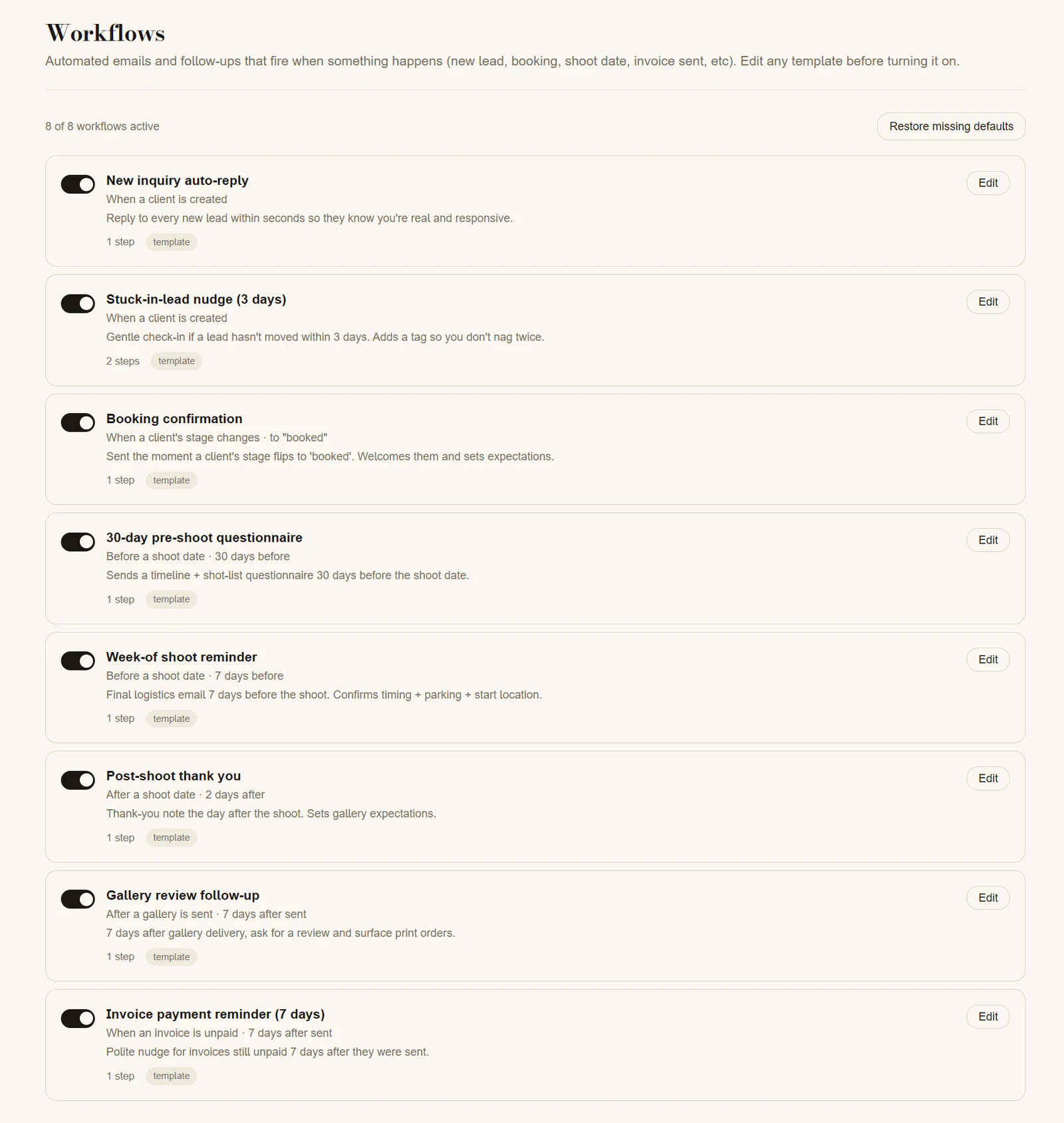
Zaiya's workflow screen shows each automation trigger, timing and purpose before a photographer opens the template to edit it.
Each workflow can be reviewed and edited before it is enabled. That matters because a useful template should still match the studio's voice, timing, package structure and exception rules. Making the trigger visible also helps a photographer understand why a message will send instead of treating automation as a black box.
Divide automation into three risk levels
Low risk: automate fully
These actions are factual and reversible:
- Create a project from a validated inquiry.
- Assign an internal follow-up task.
- Confirm that a form was received.
- Send appointment logistics and calendar details.
- Remind the team that a questionnaire is incomplete.
- Update a dashboard when a milestone is confirmed.
Medium risk: automate with review
Draft the action or schedule it, but let a person approve it:
- A personal inquiry response using the couple's details.
- A collection recommendation.
- A timeline change that affects other vendors.
- A message about an overdue balance.
- A gallery delivery email.
High risk: keep human-led
Sensitive family situations, complaints, contract exceptions, safety decisions, creative disputes and emotionally significant news need judgment and accountability.
Personalization is more than a first name
A robotic message is often a context problem, not a wording problem. Refer to a real detail the couple shared, the specific milestone they completed and the exact next step. Do not insert fields that have not been validated. “We received your final questionnaire” is better than a warm paragraph that accidentally references the wrong venue.
Keep automated messages shorter than fully personal notes. State what happened, what comes next, when it will happen and how to get help.
Use the wedding photography email workflow to decide where each message belongs.
Make the sender and reply path real
Messages should come from an address the studio monitors. Replies must reach a person or an actively managed queue. If a no-reply address is required for a transactional notice, include a visible route to support.
Match the sender name to the relationship. If clients know their photographer by name, an unexpected generic company identity can feel impersonal even when the content is accurate.
Build stop conditions before start conditions
For every sequence, define what cancels it. Common stop conditions include booking, declining, rescheduling, payment, form completion, cancellation and a manual pause.
Also define a maximum number of follow-ups. An infinite nurture sequence is not persistence; it is loss of control.
Design for exceptions and failures
Automations fail quietly when a field is missing, a provider is delayed or an integration loses authorization. Create an exception view that shows overdue promises, failed sends, unmatched records and projects with no next action.
Assign a person to review it. “The system sends it” is not ownership.
Before enabling a workflow, test:
- The happy path.
- A missing email address.
- A rescheduled wedding.
- A payment completed immediately before a reminder.
- A client reply during a sequence.
- A team member being removed.
- A provider outage or disconnected integration.
Keep the client portal current
Automation can send excellent messages while the portal shows old dates or an unpaid invoice that was settled. Treat client-visible state as part of the same workflow. Verify that important updates appear in the place clients are told to trust.
The client portal guide explains what that shared space should contain.
Add assistant connectivity to your workflow
A connected assistant can help retrieve permitted project information for a planning briefing or business question. Zaiya's connector is read-only, so it complements event-driven automation while keeping actions and approvals in the established workflow. Our AI assistant connectivity guide also explains how clients can connect their own assistants through Atrium Passes.
Measure trust, not only speed
Track response time and staff hours saved, but also track corrections, client confusion, duplicate messages, manual interventions and overdue commitments. Review a sample of sent messages each month for context and tone.
The best automation is nearly invisible. The couple experiences preparation and responsiveness; the team experiences fewer repetitive steps and clearer exceptions.
Frequently asked questions
Which wedding photography email should I automate first?
Start with the inquiry receipt confirmation or consultation logistics. Both are factual, expected and easy to stop or correct.
Should proposal follow-ups be automated?
They can be scheduled, but review them against the current project state and any recent conversation. High-value decisions benefit from a personal note.
How often should automations be audited?
Review failures weekly and the full workflow quarterly. Re-test whenever forms, pricing, team roles, payment providers or client-facing pages change.
Book a private Zaiya walkthrough to see how the workflow can live in one branded workspace.